
For businesses operating in countries where Withholding Tax (WHT) applies, calculating the correct amount, paying the vendor, recording the tax liability, and preparing the necessary reporting can add another layer of complexity to Accounts Payable.
Traditionally, companies using Microsoft Dynamics 365 Business Central might need localization features, third-party applications, or customization to handle withholding tax requirements.
With Microsoft Dynamics 365 Business Central 2026 Release Wave 1, Microsoft is introducing standard functionality to calculate withholding taxes for vendors.
This means businesses can configure, calculate, post, and settle vendor withholding tax directly within Business Central.
What Is Withholding Tax?
Withholding tax is an amount that a company is required to deduct from certain payments made to vendors or service providers.
Instead of paying the full invoice amount to the vendor, the company:
Pays part of the amount to the vendor
and
Withholds the remaining tax amount for payment to the relevant tax authority.
For example:
Supplier Invoice: RM10,000
Withholding Tax Rate: 10%
Withholding Tax: RM1,000
Amount Payable to Supplier: RM9,000
The company still recognizes the RM10,000 purchase or expense, but RM1,000 is withheld from the supplier payment and accounted for separately.
What’s New in Business Central?
Business Central now provides standard functionality for setting up and calculating withholding tax for vendors.
According to Microsoft, withholding tax can be calculated either when:
The vendor invoice is posted
or
The vendor invoice is paid
depending on the company’s configuration.
Once withholding tax applies, Business Central calculates the required tax amount and reduces the amount payable to the vendor.
This creates a more integrated process between:
Purchase Invoice → Vendor Payment → Withholding Tax → General Ledger → Tax Settlement
No Longer Relying Entirely on Customization
One of the most important aspects of this enhancement is that Microsoft is bringing withholding tax functionality into the standard version of Business Central.
Previously, depending on the country, companies might have needed:
- Localized functionality
- Third-party extensions
- Custom development
- Manual calculations
- Excel worksheets
- Additional journal entries
With the new functionality, withholding tax becomes part of the standard Business Central purchasing and finance process.
This is particularly useful for companies operating across multiple countries where withholding tax requirements may apply.
How Is Withholding Tax Set Up?
Business Central provides a structured setup for determining when withholding tax should apply and how it should be posted.
The process begins in General Ledger Setup, where the withholding tax calculation functionality can be enabled.
Businesses can then configure:
Withholding Tax Revenue Types
These define the relevant withholding tax classifications required by the business.
Withholding Tax Business Posting Group
This can be assigned to vendors that are subject to withholding tax.
Withholding Tax Product Posting Group
This can be assigned to items or General Ledger accounts to determine which types of purchases are subject to withholding tax.
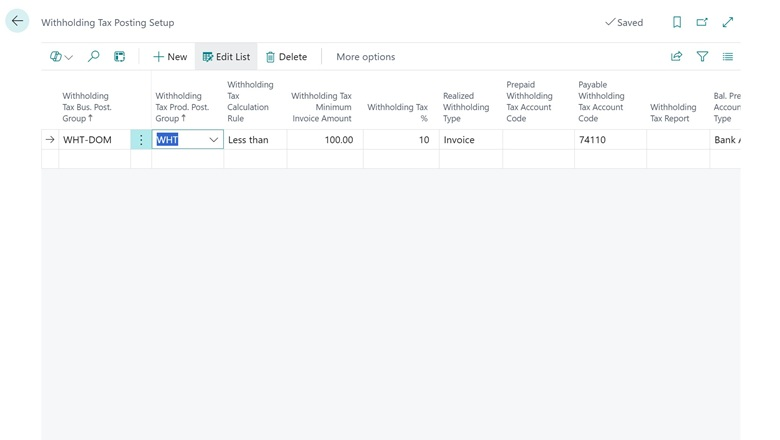
Withholding Tax Posting Setup
Business Central combines the Business Posting Group and Product Posting Group to determine the applicable withholding tax treatment and posting setup.
This concept is similar to other posting group structures already familiar to experienced Business Central users.
Example: Professional Service Invoice
Imagine your company engages a professional consultant.
The consultant submits an invoice for:
Consultancy Fee: RM20,000
Assume that, based on the applicable tax rules and company configuration, the payment is subject to a 10% withholding tax.
Business Central calculates:
Invoice Amount: RM20,000
Withholding Tax: RM2,000
Net Payment to Vendor: RM18,000
Instead of your Accounts Payable team manually calculating the RM2,000 deduction, Business Central can calculate the withholding tax according to the configured withholding tax setup.
The vendor receives RM18,000 while the RM2,000 withholding tax is recorded for subsequent settlement with the relevant authority.
Automatic Withholding Tax Entries
The benefit goes beyond calculating the amount.
When a document containing withholding tax is posted, Business Central creates a Withholding Tax Entry.
These entries provide the underlying records needed to manage and report withholding tax transactions.
This is important because Finance needs to know not only:
How much did we withhold?
but also:
Which vendor was it withheld from?
Which transaction generated the withholding tax?
When was it posted?
Has the withholding tax been settled?
Having these transactions maintained within the ERP provides a better audit trail compared with managing the information separately in spreadsheets.
Withholding Tax Settlement
Calculating withholding tax is only part of the process.
The company eventually needs to settle the withholding tax liability.
Business Central therefore provides a:
Calculate and Post Withholding Tax Settlements
function.
Finance users can use this function to process withholding tax for a specific period based on previously posted withholding tax entries.
This creates a more complete process:
Vendor Transaction
↓
Calculate Withholding Tax
↓
Create Withholding Tax Entry
↓
Review Withholding Tax for the Period
↓
Calculate & Post Settlement
This gives Finance teams better visibility over outstanding withholding tax obligations.
Control Withholding Tax by Vendor and Purchase Type
Not every vendor or purchase transaction is necessarily subject to the same withholding tax treatment.
This is why Business Central separates the setup between the vendor and the purchased item or expense.
For example:
| Vendor | Purchase | WHT Treatment |
|---|---|---|
| Local Supplier A | Raw Material | Not Applicable |
| Consultant B | Professional Service | Applicable |
| Overseas Vendor C | Technical Service | Applicable |
| Supplier D | Equipment | Depends on Setup |
The Withholding Tax Business Posting Group identifies the vendor-side requirement.
The Withholding Tax Product Posting Group identifies the purchase-side requirement.
Business Central then uses the Withholding Tax Posting Setup to determine the appropriate calculation and posting.
Users can also override the Withholding Tax Product Posting Group on individual purchase document lines when required.
Why Is This Important for Finance Teams?
Withholding tax can become difficult to manage when transaction volumes increase.
Without an integrated ERP process, Finance teams may end up maintaining separate Excel worksheets to track:
- Vendor invoice amount
- Applicable withholding tax rate
- Withholding tax amount
- Net vendor payment
- Tax classification
- Settlement status
- Reporting period
This creates additional reconciliation work between Accounts Payable, General Ledger, bank payments, and tax reporting.
By integrating withholding tax into Business Central, companies can reduce the amount of manual calculation and duplicate record keeping required.
A More Complete Accounts Payable Process
This feature also shows how Business Central continues to strengthen its Accounts Payable capabilities.
The purchasing process is no longer simply:
Purchase Invoice → Payment
It increasingly supports a more controlled process:
Purchase Order
↓
Goods / Service Receipt
↓
Purchase Invoice
↓
Invoice Matching
↓
Withholding Tax Calculation
↓
Vendor Payment
↓
Tax Settlement
↓
Financial Reporting
For Finance teams processing large numbers of vendor invoices, having these controls inside the ERP can significantly improve consistency and traceability.
Does This Mean Excel Tracking Can Be Removed?
Potentially, yes—but businesses should first review their local tax requirements.
Withholding tax legislation differs between countries and may vary based on:
- Vendor residency
- Type of service
- Nature of payment
- Tax treaty
- Transaction amount
- Applicable withholding tax rate
- Reporting requirements
- Tax authority requirements
Therefore, implementing the functionality isn’t simply a matter of switching it on.
The company’s Finance or Tax team should first define the applicable withholding tax rules before configuring Business Central.
ERP configuration should follow the company’s confirmed tax treatment—not determine it.
Our View
This is an important improvement for companies using Business Central across multiple countries.
Withholding tax has traditionally been one of those requirements that could lead companies toward localization, extensions, customization, or manual processes.
By introducing withholding tax into standard Business Central, Microsoft is reducing that dependency.
More importantly, the benefit isn’t only the automatic calculation.
The real value comes from connecting:
Vendor → Purchase → Withholding Tax → Payment → Settlement → General Ledger
within the same ERP environment.
For companies currently maintaining withholding tax calculations outside Business Central, this feature is worth reviewing as part of their future Business Central upgrade roadmap.
Availability
Microsoft lists Calculate withholding taxes for vendors as part of Dynamics 365 Business Central 2026 Release Wave 1.
Public Preview: April 1, 2026
General Availability: October 2026
The feature is planned to be enabled automatically for users.
As this functionality is currently moving from preview toward general availability, companies should review the final released functionality and their local tax requirements before implementing it in a production environment.
Reference: Microsoft Learn – Calculate withholding taxes for vendors