
Processing supplier invoices sounds straightforward—until one invoice covers multiple purchase orders, several deliveries, partial receipts, or even goods that haven’t been received yet.
With Microsoft Dynamics 365 Business Central 2026 Release Wave 1, Microsoft introduces an improved purchase invoice matching experience, including the new Matched Order Lines functionality.
The enhancement gives Accounts Payable and purchasing teams much greater flexibility when matching supplier invoices against purchase orders and receipts.
The Common Challenge: Supplier Invoices Don’t Always Match Your PO Structure
In a typical purchasing process, your company may issue several purchase orders to the same supplier.
For example:
PO1001
- Item A – 100 PCS
PO1002
- Item B – 50 PCS
PO1003
- Item C – 200 PCS
However, instead of issuing three separate invoices, the supplier might send one invoice containing:
- Item A – 100 PCS
- Item B – 50 PCS
- Item C – 100 PCS
At the same time, some goods may already have been received, while others are still pending delivery.
This creates additional work for the Accounts Payable team when they need to determine:
Which invoice line belongs to which PO and which receipt?
The new purchase order matching functionality in Business Central is designed to make this process easier.
Introducing “Get Order Lines” and “Matched Order Lines”
Previously, users commonly relied on the Get Receipt Lines function when creating a purchase invoice.
Get Receipt Lines is useful when goods have already been received because users can retrieve the posted receipt lines and include them in the supplier invoice.
The new functionality goes further.
Business Central now provides a Get Order Lines action on the Purchase Invoice.
This allows users to retrieve purchase order lines that are:
- Received but not yet invoiced
- Not yet received
- Associated with posted receipt lines
- Spread across multiple purchase orders
More importantly, one purchase invoice line can be matched against multiple purchase order lines.
This provides significantly more flexibility when the supplier’s invoice structure doesn’t exactly follow your company’s purchase order structure.
What Is the “Matched Order Lines” Page?
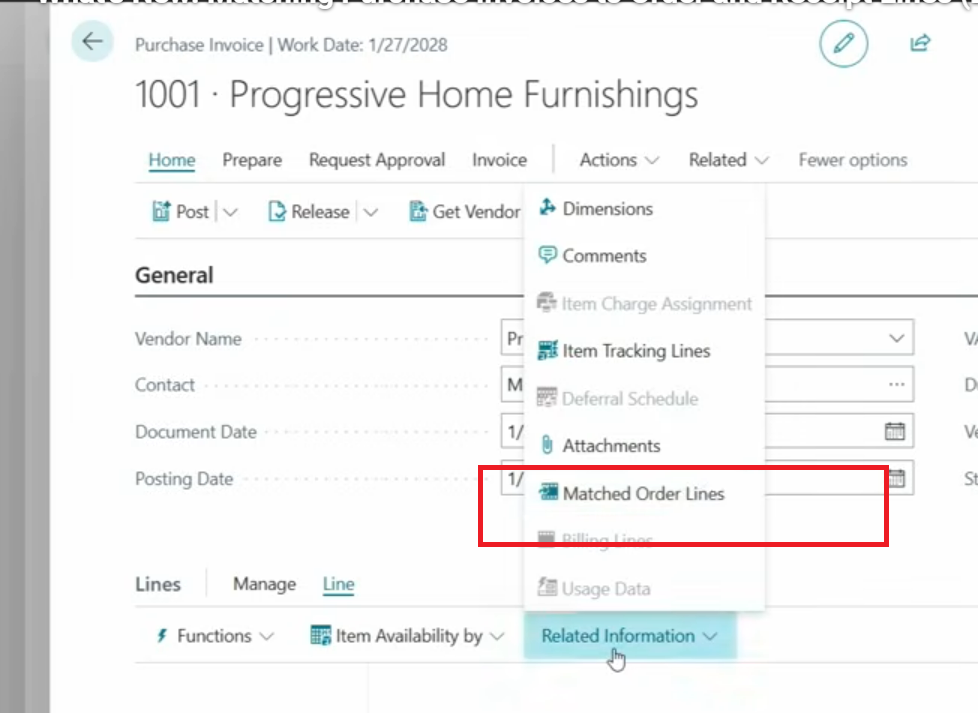
After matching the supplier invoice, users can open the Matched Order Lines page directly from the purchase invoice line.
From here, users can review exactly which purchase order and receipt lines are connected to the invoice line.
For example:
Supplier Invoice Line
Steel Coil – 10 MT – RM30,000
Matched Order Lines
PO1001 – 3 MT
PO1025 – 2 MT
PO1048 – 5 MT
Total Matched: 10 MT
Instead of forcing Accounts Payable users to manually restructure the supplier invoice, Business Central maintains the relationship between the invoice and the relevant purchase orders.
Users can also adjust quantities, add additional purchase order or receipt lines, and review discrepancies such as differences in price or amount.
The Matched Order Lines page can also be opened from the purchase invoice header, allowing users to review the matching status of the entire invoice.
Better Visibility from the Purchase Order
The improvement isn’t limited to the Purchase Invoice.
Business Central also introduces a Matched Invoice Lines field on the Purchase Order.
This allows purchasing users to see how much of a purchase order line has already been matched against purchase invoice lines.
This provides better visibility between:
Purchase Order → Goods Receipt → Supplier Invoice
and makes it easier for purchasing and finance teams to understand the status of outstanding orders and invoices.
What If the Invoice Arrives Before the Goods?
This is another interesting improvement.
In some businesses, especially when dealing with overseas suppliers, raw materials, machinery, or long lead-time purchases, the supplier invoice may arrive before the physical goods.
Previously, the normal process could become more complicated because there was no posted receipt available to retrieve.
With Get Order Lines, users can match the supplier invoice directly against the relevant purchase order even when the goods haven’t been received yet.
The company can then decide whether to:
Receive the goods later manually
or
Use the new Receipt on Invoice functionality.
Receipt on Invoice
Business Central also introduces a Receipt on Invoice option.
When this option is enabled on the purchase order, posting the linked purchase invoice can automatically create the required purchase receipt.
This can simplify scenarios where the company considers the supplier invoice sufficient confirmation for receiving the goods.
However, this option should be used carefully because Microsoft doesn’t allow auto-receipt in certain scenarios, including advanced warehouse operations, item tracking, and partially received orders.
Example: How It Works in Practice
Imagine your company purchases steel materials from Supplier ABC.
You have three purchase orders:
| Purchase Order | Material | Quantity |
|---|---|---|
| PO001 | Steel Coil A | 10 MT |
| PO002 | Steel Coil B | 20 MT |
| PO003 | Steel Coil C | 15 MT |
The supplier subsequently sends one invoice covering materials from all three purchase orders.
Instead of manually creating separate invoice relationships, the AP user can create the Purchase Invoice and select:
Get Order Lines
Business Central displays the relevant purchase order lines.
The user selects the applicable PO lines and Business Central establishes the matching relationship.
The AP user can then open:
Matched Order Lines
to review the exact PO quantities connected to each supplier invoice line before posting.
This creates a much clearer audit trail and reduces the risk of invoicing the wrong purchase order or quantity.
Why Is This Important for Businesses?
The biggest benefit isn’t simply another new Business Central button.
It improves the control between Purchasing, Warehouse and Finance.
Companies frequently encounter situations such as:
- One supplier invoice covering several purchase orders
- One PO delivered through several shipments
- Partial deliveries
- Invoice quantities different from receipt quantities
- Supplier invoice arriving before the goods
- Purchasing and Finance maintaining different records
- AP staff spending time manually identifying the correct PO
- Incorrect PO or receipt lines being invoiced
The improved matching functionality gives users a clearer relationship between the supplier invoice and the underlying purchasing transactions.
For companies processing a high volume of supplier invoices every month, this can reduce manual checking and help prevent posting mistakes.
Matched Order Lines vs. Get Receipt Lines
It is important to understand that Get Receipt Lines hasn’t simply become useless.
The two approaches support different scenarios.
| Get Receipt Lines | Get Order Lines / Matched Order Lines |
|---|---|
| Primarily based on posted receipts | Based on purchase order lines |
| Goods must normally have been received | Can also work before receipt |
| Traditional receipt-to-invoice workflow | More flexible PO-to-invoice matching |
| Suitable for straightforward purchasing | Better for complex supplier invoices |
| Receipt lines are brought into the invoice | Invoice lines can be linked to multiple PO/receipt lines |
For businesses with simple purchasing processes, Get Receipt Lines may continue to work perfectly well.
For businesses dealing with multiple POs, partial deliveries and consolidated supplier invoices, Matched Order Lines provides much greater flexibility.
Important Limitations
There are several limitations that businesses should understand before adopting this process.
According to Microsoft, the functionality doesn’t support certain scenarios, including:
- Purchase orders with prepayments
- Item Charge lines
- Project-linked orders
- Subcontracting
- Blanket orders
- Intercompany transactions
There are also additional restrictions around the automatic Receipt on Invoice capability.
For example, auto-receipt can’t be used for partially received lines or locations using directed put-away and pick.
Companies using advanced warehouse processes or item tracking should therefore review their purchasing workflow before enabling automatic receipt functionality.
Our View
This may look like a relatively small Business Central enhancement, but it addresses a very practical problem faced by purchasing and finance teams.
Real-world supplier invoices don’t always follow the exact structure of purchase orders.
A supplier might combine three POs into one invoice, invoice only part of an order, or issue the invoice before the warehouse completes the receiving process.
ERP systems need enough flexibility to handle these situations while still maintaining the relationship between:
Purchase Order → Receipt → Supplier Invoice → Accounting
The new Matched Order Lines functionality brings Business Central closer to how purchasing actually operates in the real world.
For companies with high purchasing volumes, multiple warehouses, partial deliveries, or complex supplier invoicing arrangements, this is definitely a feature worth reviewing when upgrading to the latest version of Microsoft Dynamics 365 Business Central.
Microsoft Dynamics 365 Business Central 2026 Release Wave 1
The purchase invoice matching enhancement became generally available from 1 April 2026 and is enabled automatically for users.
Companies upgrading their Business Central environment should review the new Get Order Lines, Matched Order Lines, Matched Invoice Lines, and Receipt on Invoice functionality as part of their purchasing and Accounts Payable process review.
Reference: Microsoft Learn – Match purchase invoices to multiple order and receipt lines